Nginx Configuration : Tips to use Nginx Servers

About Nginx : Nginx was created in 2004 by a Russian developer Igor Sysoev.

He wanted to build a webserver capable of handling 10000 concurrent connections with focus on performance, high concurrency and low memory usage. Presently Nginx serves majority of the world top websites due to its performance and ease of usage. In March 2019, the Nginx company was acquired by F5 Networks for $670 million. As of August 2019, Netcraft estimated Nginx served 32 percent of all active websites ranked, ranking it first just above Apache at 29 percent.
NGINX vs APACHE
There has always been comparisons between Nginx and Apache since both these are one of the most used webservers in the world. But with comparisons comes questions in the mind of the users using either of the tools to know the better one or a bit reliable one. There may not be any direct answers for the above question but the basic comparisons below may help the users to know which tool to use as per their needs.
- Apache comes with a prefork () configuration mode. This configuration mode means that there are set number of processes which can serve a single request at a time. Nginx deals with request in asynchronous mode. A single Nginx process can serve multiple requests concurrently. The number of requests can be dependent on the system resources available.
- Since Nginx uses asynchronous configuration mode, Nginx cannot embed server side programming languages into its own process.Separate process are required to serve dynamic content. Example Node or PHP backend are served by a separate process and then reversed proxy phenomenon is used to send the dynamic content to client.Apache embeds server side programming languages into its own process
- Apache uses more system resources since it deals with server side programming/dynamic content in the same process where Nginx is less resource hungry since a separate process is present to serve dynamic content.
- Nginx will not use or involve server side process for every request, In case the request is static, the backend server will not even know about the request being served by Nginx whereas in Apache, every request/static or dynamic is served by a single process results in using more system resources.
- Asynchronous config allows Nginx to receive thousands of request on a single processing thread and it can respond to them as fast as it can without turning down the requests. Apache on the other hand also accepts requests up to some preconfigured number and reject the rest. Analyzing the above reasons we can say that Nginx has a upper hand over Apache considering the load factor and performance parameters.
Terminologies
Context: Section within the Configuration file. The context contains various configuration options in the configuration file. The topmost context is the configuration file itself. Configuration is the main context. Other Context is http context (for http related request), server context (for defining a virtual host), and location context (for matching URI locations for incoming requests)
| http { include mime.types; default_type app/octet-stream; } |
| server { listen 80 default_server; server_name localhost 172.24.3.37; allow all; } |
| location /xxxx { root html; } |
Directives: Directives is a specific configuration option that is updated in the configuration file.
server {
server_name localhost 172.24.3.37;
}
The information inside the Sever context is the directive where server_name is the name of the directive and localhost 172.24.3.37 is the value of the directive.
Adding an NGINX init Service :
Configuring a systemd service for Nginx will not only allow us to start, stop or restart / reload nginx in a standardized way but also allow us to start Nginx on boot much simpler.
To enable the systemd service we need to add a small script which is universal across all OS platforms.
The script needs to be configured in this location. The file may not be preset if it’s a fresh system. The file needs to be created in the same location.
/lib/systemd/system/nginx.service
There will be a pre-recorded script in the same location. The script needs to be changed as per the system on which it is set. The standard script is as below.
[Unit]
Description=The NGINX HTTP and reverse proxy server
After=syslog.target network.target remote-fs.target nss-lookup.target
[Service]
Type=forking
PIDFile=/run/nginx.pid ( These path may vary across systems)
ExecStartPre=/usr/sbin/nginx -t
ExecStart=/usr/sbin/nginx
ExecReload=/usr/sbin/nginx -s reload
ExecStop=/bin/kill -s QUIT $MAINPID
PrivateTmp=true
[Install]
WantedBy=multi-user.target
Nginx can now be started using systemd command as below.
systemctl start nginx ( systemctl command is used for RHEL Version 7 and above).
The status can be checked using
Systemctl status nginx
Virtual Host: Virtual Host is used to serve static files from the directory in a particular server. The virtual host is setup on nginx.conf file in the system. There are various blocks in nginx configuration file. The blocks are specifically called as Context as mentioned before
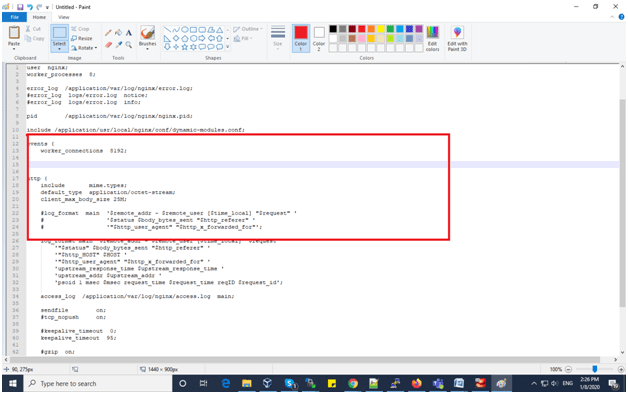
Server Context/Server Block: Server Context is used to define Virtual Host. A major prerequisite for using Server context is to add an events context before it. It must be noted that even if the events context is left empty, the context must be present in the nginx configuration file for the conf file to be valid as in the below snapshot.
Each virtual host is a server context or a server block. Typically a server context or virtual host is responsible for listening port 80 for http or port 443 for https request for a given IP address or domain. We can use listen directive to listen to http/https request. Below is the example
server {
listen 80 default_server;
server_name localhost 172.24.3.37;
allow all;
}
Listen Directive is mentioned as 80 to listen to http request. It may also be noted that if directive “listen” is not mentioned or removed, nginx by default assumes request is from port 80 or http.
Server Directive is the Server name of the domain /ip address for which the server context exists.
Root Directive is the root path from which Nginx will be serving requests or interpreting static requests from root directive.
server {
listen 80 default_server – Listen directive
server_name localhost 172.30.58.58; Server Directive
location ~ /.well-known { – Root Directive
allow all;
}
Location Block/Location Context: This is the most used context in any Nginx configuration. This is used to configure the behavior of specific URI’s or request. The location context can be understood as an interceptor for request based on its value i.e URI. The location context is used inside the server context. The location context takes a parameter before opening the braces. The parameter serves as the URI to match and serve the request.
location /welcome { Welcome- URI to match
return 200 ‘hello ”/welcome” location.’;
modsecurity;
}
This means that we can redirect the request, respond to the request or manipulate the response. The example above shows a prefix match. This means any string with the word ‘ Welcome’ in prefix will be matched and response is available. If a prefix match is not required , then a modifier can be used before the pattern. Example as shown below
Location – /welcome { Exact Match
location /welcome Prefix Match
location ~ /welcome[0-9] Regular Expression Match. The tilde symbol is case sensitive.
location ~* /welcome[0-9] Regular Expression Case Insensitive match.
Location ^~ /welcome Preferential Prefix Match Nginx supports a priority pattern for the following matches. The Regular Expression matches has a higher priority over exact match. The Preferential Prefix Match has a higher priority over Regular Expression Match.
This means that we can redirect the request, respond to the request or manipulate the response. The example above shows a prefix match. This means any string with the word ‘ Welcome’ in prefix will be matched and response is available. If a prefix match is not required , then a modifier can be used before the pattern. Example as shown below
Location – /welcome Exact Match
location /welcome Prefix Match
location ~ /welcome[0-9] Regular Expression Match. The tilde symbol is case sensitive.
location ~* /welcome[0-9] Regular Expression Case Insensitive match.
Location ^~ /welcome Preferential Prefix Match
Nginx supports a priority pattern for the following matches. The Regular Expression matches has a higher priority over exact match. The Preferential Prefix Match has a higher priority over Regular Expression match
Reverse Proxy: Reverse Proxy acts as an intermediary between client and the resource. The client is the browser and the resource can be the backend. The reverse proxy only takes cognizance of the port which is used to route the information from backend to client (i.e the browser) and the information from client to backend.
server {
listen 80 default_server;
server_name localhost 172.24.3.37;
location /welcome { /*Welcome- URI to match*/
return 200 ”This is Nginx\n” ;
}
Location /tomcat {
proxy_pass ‘http://localhost:9900/’;
}
}
As per the sample configuration updated above , Nginx acts as a reverse proxy for location block. Nginx gets the resources from Tomcat server by only identifying the port 9900. The browser gets the request from tomcat server via Nginx which acts as reverse proxy.
 Tech Square